Add MyLiveChat to your Volusion store
MyLiveChat provides an easy way to integrate your Volusion
online store with MyLiveChat. MyLiveChat helps your team answer visitors quickly, collect offline messages, and keep support conversations organized. It lets your team answer visitors in real time, see helpful visitor context, and keep every conversation available for follow-up.
Use this guide to add MyLiveChat to your Volusion store. If you do not have a MyLiveChat account yet,
create a free MyLiveChat account.
Start free
Step 1. Get your MyLiveChat code
Sign in to the MyLiveChat web console and click
Deployment menu on the left. Choose Embedded Chat tab and copy the MyLiveChat
code.
Step 2. Edit the template and Add the MyLiveChat code
Now sign in to your Volusion Dashboard. You need to:
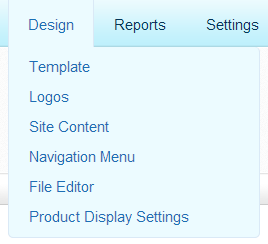
- Click Design -> Template menu on the top
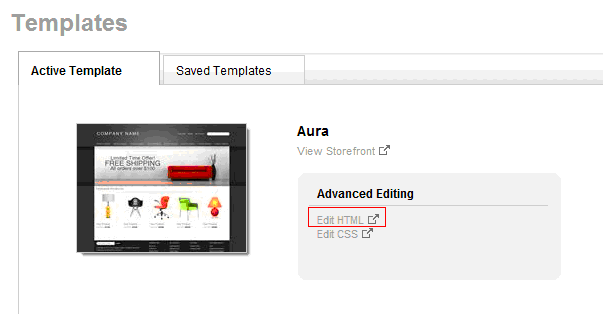
- Select the current template you use. In the Advanced Editing area click Edit HTML to edit template
- Add the MyLiveChat code to bottom of template.
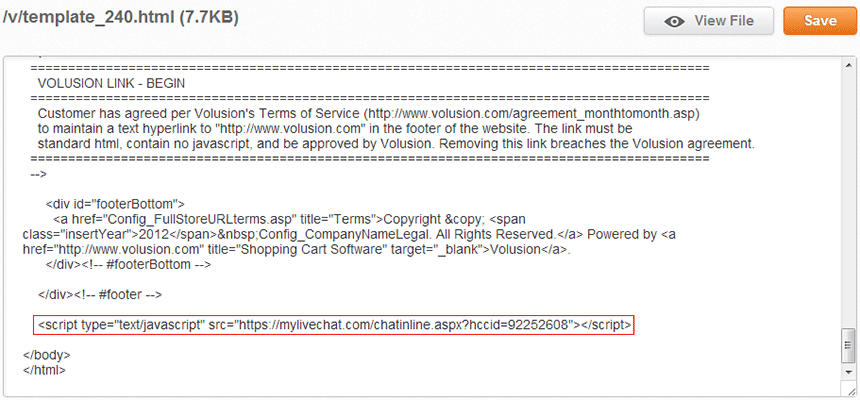
- Click Save button.
Check that live chat is working
Save the template, then open your store in a private browsing window. A private window matters: as a signed-in
administrator you may see a different version of the page than your visitors do.
- Look for the chat launcher on the page. If it is missing, view the page source and
search for mylivechat to confirm the code is really being served.
- Start a chat as a visitor and send a test message.
- Sign in to the web console and confirm the message arrives
and that you can reply.
- Close the chat and check the transcript is saved, so you know follow-up will work.
If your store caches pages, clear the cache before deciding something is broken. A cached
copy of the old page is the single most common reason a correct installation looks like a
failed one.
Common Volusion setup mistakes
- The snippet was added above the closing body tag of one page. Use the shared template so every storefront page carries the code.
- Chat looks offline to everyone. The widget shows an offline form when no
agent is signed in. That is working as intended - set your hours and your offline
message so the page tells visitors when to expect a reply.
Make the chat window fit your store
Colours, position, language and the pre-chat form are all set in your MyLiveChat
dashboard, not in the Volusion code, so you can change them without touching your store again.
See customization options for what can be
changed, and visitor monitoring if you want to
see which page a visitor is on before you reply.
Related guides
New to live chat? Start with
how to add live chat to your
website and the
live chat launch checklist.
Also useful: Using chat to recover abandoned carts.
Also useful: Answering order-tracking questions.
If you are worried about page speed, see
does live chat slow down your
website.
What's next?
After setup, sign in to the web console to answer visitors from your browser. You can also use the desktop app from the download page if your team prefers it.
Volusion live chat FAQ
Will the chat button show on every page?
Yes, when the code is added to the shared template rather than to individual pages.
What happens when I change my template?
The code goes with the template you edited. Re-add it after a design change and check a product page.
Will it slow down my store?
The chat code loads asynchronously, so it does not block your page from rendering. If you want to check that for yourself rather than take our word for it, measure your own pages before and after with your usual speed tool.
Is it really free?
Yes. One agent, unlimited chats and unlimited websites are free forever, with no credit card required.
Any questions?
If anything is unclear, contact our support team from the chat button on this page or visit the Support page. We can help you choose the right setup path.